Gitea Behind nginx: Restricting CORS, Blocking Hotlinking, and Tuning the Cache

Contents
Introduction
It started when my server monitor kept showing abnormal load and bandwidth on the machine I use only for hosting websites.
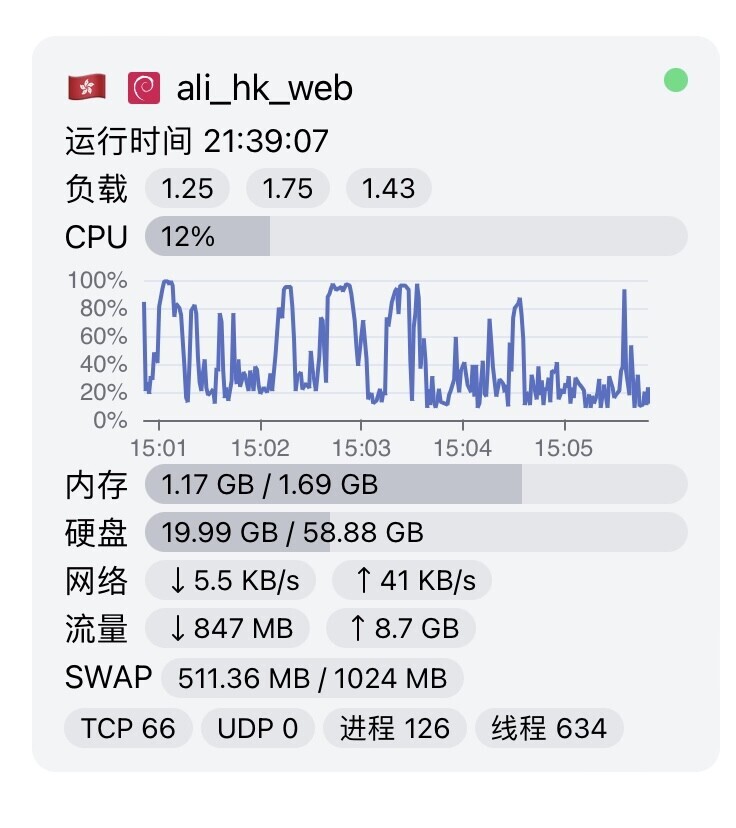
I shut everything down and checked services one at a time. With only the Gitea Docker container running there was no abnormal load, and with every service except the Gitea reverse proxy running there was none either. But as soon as I enabled the nginx config for the Gitea reverse proxy, the monitor immediately showed bandwidth being eaten and CPU usage regularly maxing out. I looked at the nginx access log:
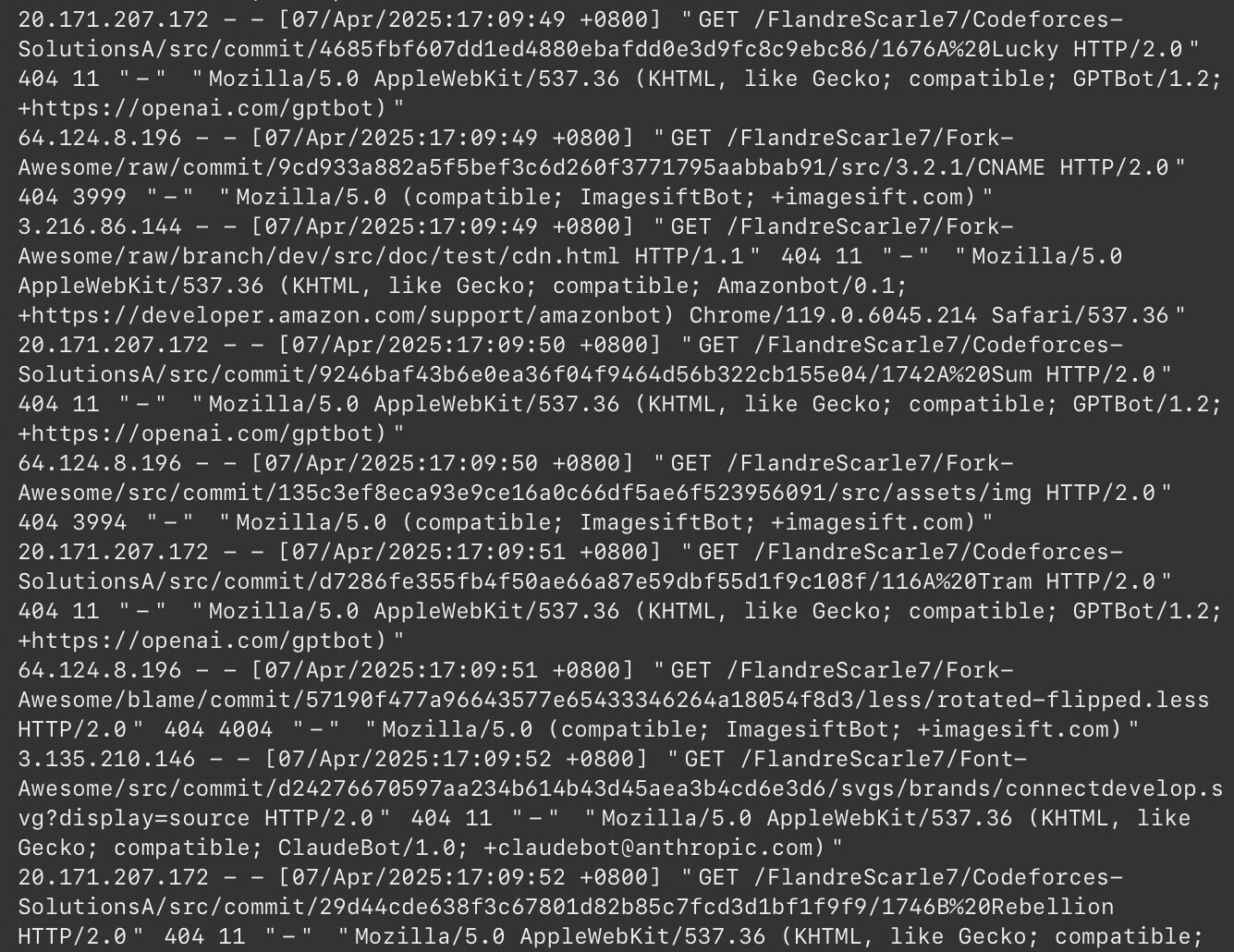
As the picture shows, lots of bots (crawlers) were crawling my Gitea. Looking back, I had pulled some static assets (Font Awesome and the like) into Gitea, set those repositories as mirrors, and turned on scheduled syncing. The goal was to serve my main site’s assets from my own Gitea to speed things up. But exactly that, the repeated pulls and the mirror setup, is what led these legitimate crawlers to my Gitea. Most of them belonged to big companies such as OpenAI, Amazon and Claude. Whatever their purpose, I didn’t want my Gitea’s bandwidth and resources tied up by endless pointless GETs. So I tinkered to solve this, which led to more tinkering in other areas, such as CORS restrictions and hotlink protection. Sure enough, life is all about tinkering (kidding). First, the crawlers. These legitimate crawlers respect the gentlemen’s agreement, robots.txt, so we can put a robots.txt in the site’s root directory.
User-agent: *
Disallow: /
The User-agent field sets which bots the rule matches; * matches all of them. The Disallow field sets the paths that may not be accessed; / means all of them. However, the main location in my Gitea nginx config proxies to http://localhost:3000, so /robots.txt can’t be served. The following goes before all other location blocks:
location = /robots.txt {
    root /path/to/your/domain;
    try_files $uri =404;
}
OK, that’s the end of the introduction. Two or three days after doing the above, the legitimate crawlers really did stop crawling my site, and bandwidth and load went back to normal. By rights I should have stopped exploring there, right? But life is all about tinkering! If I didn’t keep going, something would always feel imperfect and incomplete. On to the main part: to let only my own websites request assets from my Gitea, I need CORS restrictions and hotlink protection.
Main nginx config
First edit the main nginx config. To keep things separate, I created a dedicated gitea.conf under /.../nginx/customize/
    # Cache path; fill in your own path.
    proxy_cache_path /path/to/your/domain/cache
        levels=1:2
        keys_zone=GITEA_CACHE:256m
        inactive=7d
        max_size=10g
        use_temp_path=off;

    # Dynamic cache-bypass map
    map $request_method $skip_cache {
        default     0;
        POST        1;
        PUT         1;
        DELETE      1;
        PATCH       1;
    }

    # CORS config
    map $http_origin $gitea_allow_origin {
        default "";
        "~^https?://(.*\.)?scarle7\.tech(:[0-9]+)?$" $http_origin;
        "~^https?://(.*\.)?flandre\.vip(:[0-9]+)?$" $http_origin;
        "~^https?://git\.scarle7\.tech(:[0-9]+)?$" $http_origin;
    }
The GITEA_CACHE after keys_zone is a name we define, and so is gitea_allow_origin; the config below refers to both. Since the content above actually belongs in the http block, include that file in the http block of the main config nginx.conf.
...... #other content
http {
    include /.../nginx/customize/gitea.conf
    # leave the rest of the existing config unchanged
}
CORS restrictions
We already defined the gitea_allow_origin variable above, containing the allowed domains, so we can use it directly for control.
Note: the “≠” in the code highlighting below is actually “!=”. The code is rendered in JetBrains’ default modern font, so it looks the same as in JetBrains. This is called a “ligature”: it only makes the code look nicer and doesn’t affect copying. You’ll find you can’t copy the “≠” on its own, because it is really two characters. Likewise, JetBrains renders “<=” as “≤”, and there are many other ligatures to discover.
        if ($gitea_allow_origin != "") {
            add_header 'Access-Control-Allow-Origin' $gitea_allow_origin always;
            add_header 'Access-Control-Allow-Methods' 'GET, POST, OPTIONS' always;
            add_header 'Access-Control-Allow-Headers' 'DNT,X-CustomHeader,Keep-Alive,User-Agent,X-Requested-With,If-Modified-Since,Cache-Control,Content-Type,Authorization' always;
            add_header 'Access-Control-Allow-Credentials' 'true';
        }
Preflight request handling
        if ($request_method = 'OPTIONS') {
            add_header 'Access-Control-Allow-Origin' $gitea_allow_origin always;
            add_header 'Access-Control-Allow-Methods' 'GET, POST, OPTIONS' always;
            add_header 'Access-Control-Allow-Headers' 'DNT,X-CustomHeader,Keep-Alive,User-Agent,X-Requested-With,If-Modified-Since,Cache-Control,Content-Type,Authorization';
            add_header 'Access-Control-Allow-Credentials' 'true';
            add_header 'Access-Control-Max-Age' 1728000;
            add_header 'Content-Type' 'text/plain charset=UTF-8';
            add_header 'Content-Length' 0;
            return 204;
        }
All of the above lives inside the main location block. The complete main location should look like this:
# Main request handling
    location / {
        proxy_pass http://localhost:3000;
        proxy_set_header Host $host;
        proxy_set_header X-Real-IP $remote_addr;

        # CORS control (uses the dedicated variable)
        if ($gitea_allow_origin != "") {
            add_header 'Access-Control-Allow-Origin' $gitea_allow_origin always;
            add_header 'Access-Control-Allow-Methods' 'GET, POST, OPTIONS' always;
            add_header 'Access-Control-Allow-Headers' 'DNT,X-CustomHeader,Keep-Alive,User-Agent,X-Requested-With,If-Modified-Since,Cache-Control,Content-Type,Authorization' always;
            add_header 'Access-Control-Allow-Credentials' 'true';
        }

        # Preflight request handling
        if ($request_method = 'OPTIONS') {
            add_header 'Access-Control-Allow-Origin' $gitea_allow_origin always;
            add_header 'Access-Control-Allow-Methods' 'GET, POST, OPTIONS' always;
            add_header 'Access-Control-Allow-Headers' 'DNT,X-CustomHeader,Keep-Alive,User-Agent,X-Requested-With,If-Modified-Since,Cache-Control,Content-Type,Authorization';
            add_header 'Access-Control-Allow-Credentials' 'true';
            add_header 'Access-Control-Max-Age' 1728000;
            add_header 'Content-Type' 'text/plain charset=UTF-8';
            add_header 'Content-Length' 0;
            return 204;
        }
    }
Hotlink protection for static assets
This is simple: nginx’s built-in valid_referers and invalid_referer do the job. Note that even though the main location already proxies, you have to set the proxy again here.
    location ~* \.(css|js|png|jpe?g|gif|ico|svg|woff2|ttf|woff)$ {
    valid_referers none blocked server_names
            scarle7.tech www.scarle7.tech *.scarle7.tech
            flandre.vip www.flandre.vip *.flandre.vip;
        if ($invalid_referer) {
            return 403;
        }
    proxy_pass http://localhost:3000;
}
Warning
With the settings above, requests from allowed domains to git.scarle7.tech get Access-Control-Allow-Origin and work fine, but responses for the listed static assets don’t include Access-Control-Allow-Origin, so the browser blocks them with CORB.
The reason is that this location overrides the CORS handling for static assets: assets not listed are still handled by the main location, but the listed ones are no longer handled by it. The fix is to add the CORS handling to the hotlink-protection location block as well. The complete hotlink-protection config is:
location ~* \.(css|js|png|jpe?g|gif|ico|svg|woff2|ttf|woff)$ {
    valid_referers none blocked server_names
            scarle7.tech www.scarle7.tech *.scarle7.tech
            flandre.vip www.flandre.vip *.flandre.vip;
        if ($invalid_referer) {
            return 403;
        }

        if ($gitea_allow_origin != "") {
            add_header 'Access-Control-Allow-Origin' $gitea_allow_origin always;
            add_header 'Access-Control-Allow-Methods' 'GET, POST, OPTIONS' always;
            add_header 'Access-Control-Allow-Headers' 'DNT,X-CustomHeader,Keep-Alive,User-Agent,X-Requested-With,If-Modified-Since,Cache-Control,Content-Type,Authorization' always;
            add_header 'Access-Control-Allow-Credentials' 'true';
        }

        if ($request_method = 'OPTIONS') {
            add_header 'Access-Control-Allow-Origin' $gitea_allow_origin always;
            add_header 'Access-Control-Allow-Methods' 'GET, POST, OPTIONS' always;
            add_header 'Access-Control-Allow-Headers' 'DNT,X-CustomHeader,Keep-Alive,User-Agent,X-Requested-With,If-Modified-Since,Cache-Control,Content-Type,Authorization';
            add_header 'Access-Control-Allow-Credentials' 'true';
            add_header 'Access-Control-Max-Age' 1728000;
            add_header 'Content-Type' 'text/plain charset=UTF-8';
            add_header 'Content-Length' 0;
            return 204;
        }
    }
Cache control
The GITEA_CACHE path defined above doesn’t exist yet, so create it and set permissions first.
sudo mkdir -p /path/to/your/domain/cache
sudo chown -R www:www /path/to/your/domain/cache
sudo chmod -R 755 /path/to/your/domain/cache
Add the following to each of the two location blocks above
# main
        proxy_cache GITEA_CACHE;
        proxy_cache_valid 200 302 12h;
        proxy_cache_bypass $skip_cache;
        add_header X-Cache-Status $upstream_cache_status;
# place it between the proxy part and the CORS part
# ....proxy part   cache part    CORS part....

# hotlink protection
        proxy_cache GITEA_CACHE;
        proxy_cache_valid 200 302 30d;
        expires 365d;
        add_header Cache-Control "public, immutable";
# place it before proxy_pass
# ....    cache part   proxy_pass
For gitea, we shouldn’t cache api and admin; those pages must always be live. So a final location handles what must not be cached
    location ~ ^/(api|admin) {
        proxy_pass http://localhost:3000;
        proxy_no_cache 1;
        proxy_cache_bypass 1;
        add_header Cache-Control "no-store";
    }
That’s all the configuration; just reload. The full reference config is at the end. Once done, check that Gitea still works normally, then move on to testing.
Verifying CORS and hotlink protection
1. CORS
Allowed domain
curl -I -H "Origin: https://scarle7.tech" https://git.scarle7.tech
# returned: Access-Control-Allow-Origin: https://scarle7.tech √ passed
Disallowed domain
For example Baidu
curl -I -H "Origin: https://baidu.com" https://git.scarle7.tech
# no Access-Control-Allow-Origin header √ passed
2. Hotlink protection
Allowed referer
curl -I -e "https://scarle7.tech" https://git.scarle7.tech/static/image.png
# returns 200 √ passed
Disallowed referer
curl -I -e "https://steal.com" https://git.scarle7.tech/static/image.png
# returns 403 Forbidden √ passed
3. Caching works
# first request (should MISS)
curl -I https://git.scarle7.tech/test/test.css
# actual response header: X-Cache-Status: MISS

# second request (should HIT)
curl -I https://git.scarle7.tech/test/test.css
# actual response header: X-Cache-Status: HIT
# √ passed
Full config
The full config should add security headers in the server block
server
{
    ......
    ......
    # other config, including listen ports, ssl and other basics

    add_header Strict-Transport-Security "max-age=31536000";
    add_header Alt-Svc 'quic=":443"; h3=":443"; h3-29=":443"; h3-27=":443";h3-25=":443"; h3-T050=":443"; h3-Q050=":443";h3-Q049=":443";h3-Q048=":443"; h3-Q046=":443"; h3-Q043=":443"';
    add_header X-Frame-Options "SAMEORIGIN";
    add_header X-Content-Type-Options "nosniff";
    add_header Referrer-Policy "strict-origin-when-cross-origin";

    # robots.txt
    location = /robots.txt {
    root /www/wwwroot/git.scarle7.tech;
    try_files $uri =404;
        }

    # Main request handling
    location / {
        proxy_pass http://localhost:3000;
        proxy_set_header Host $host;
        proxy_set_header X-Real-IP $remote_addr;

        # Cache config
        proxy_cache GITEA_CACHE;
        proxy_cache_valid 200 302 12h;
        proxy_cache_bypass $skip_cache;
        add_header X-Cache-Status $upstream_cache_status;

        # CORS config
        if ($gitea_allow_origin != "") {
            add_header 'Access-Control-Allow-Origin' $gitea_allow_origin always;
            add_header 'Access-Control-Allow-Methods' 'GET, POST, OPTIONS' always;
            add_header 'Access-Control-Allow-Headers' 'DNT,X-CustomHeader,Keep-Alive,User-Agent,X-Requested-With,If-Modified-Since,Cache-Control,Content-Type,Authorization' always;
            add_header 'Access-Control-Allow-Credentials' 'true';
        }

        # Preflight request handling
        if ($request_method = 'OPTIONS') {
            add_header 'Access-Control-Allow-Origin' $gitea_allow_origin always;
            add_header 'Access-Control-Allow-Methods' 'GET, POST, OPTIONS' always;
            add_header 'Access-Control-Allow-Headers' 'DNT,X-CustomHeader,Keep-Alive,User-Agent,X-Requested-With,If-Modified-Since,Cache-Control,Content-Type,Authorization';
            add_header 'Access-Control-Allow-Credentials' 'true';
            add_header 'Access-Control-Max-Age' 1728000;
            add_header 'Content-Type' 'text/plain charset=UTF-8';
            add_header 'Content-Length' 0;
            return 204;
        }
    }

    # Static asset hotlink protection
    location ~* \.(css|js|png|jpe?g|gif|ico|svg|woff2|ttf|woff)$ {
    valid_referers none blocked server_names
            scarle7.tech www.scarle7.tech *.scarle7.tech
            flandre.vip www.flandre.vip *.flandre.vip;
        if ($invalid_referer) {
            return 403;
        }

        if ($gitea_allow_origin != "") {
            add_header 'Access-Control-Allow-Origin' $gitea_allow_origin always;
            add_header 'Access-Control-Allow-Methods' 'GET, POST, OPTIONS' always;
            add_header 'Access-Control-Allow-Headers' 'DNT,X-CustomHeader,Keep-Alive,User-Agent,X-Requested-With,If-Modified-Since,Cache-Control,Content-Type,Authorization' always;
            add_header 'Access-Control-Allow-Credentials' 'true';
        }

        if ($request_method = 'OPTIONS') {
            add_header 'Access-Control-Allow-Origin' $gitea_allow_origin always;
            add_header 'Access-Control-Allow-Methods' 'GET, POST, OPTIONS' always;
            add_header 'Access-Control-Allow-Headers' 'DNT,X-CustomHeader,Keep-Alive,User-Agent,X-Requested-With,If-Modified-Since,Cache-Control,Content-Type,Authorization';
            add_header 'Access-Control-Allow-Credentials' 'true';
            add_header 'Access-Control-Max-Age' 1728000;
            add_header 'Content-Type' 'text/plain charset=UTF-8';
            add_header 'Content-Length' 0;
            return 204;
        }

        # Stronger caching
        proxy_cache GITEA_CACHE;
        proxy_cache_valid 200 302 30d;
        expires 365d;
        add_header Cache-Control "public, immutable";
        proxy_pass http://localhost:3000;
    }

    # Content that is never cached
    location ~ ^/(api|admin) {
        proxy_pass http://localhost:3000;
        proxy_no_cache 1;
        proxy_cache_bypass 1;
        add_header Cache-Control "no-store";
    }

    if ( $uri ~ "^/\.well-known/.*\.(php|jsp|py|js|css|lua|ts|go|zip|tar\.gz|rar|7z|sql|bak)$" ) {
        return 403;
    }

    access_log  /path/to/logs/access.log;
    error_log  /path/to/logs/error.log;
}
END